


Recommended Blogs

Blog
Master SQL Query Optimization: 12 Proven Techniques to Enhance Database Performance
Table of Content
- Key Principles for Effective SQL Query Optimization
- How SQL Works - The Key to Faster, Smarter Queries
- 12 Proven SQL Query Optimization Techniques to Boost Database Performance
- Essential Tools and Resources for SQL Query Optimization
- Why TxMinds is Your Ultimate Partner for SQL Query Optimization
Share On


Modern databases rarely fail because of volume alone. In fact, research by the International Journal of Computing and Engineering (2025) shows that inefficient SQL queries account for 63% of performance issues, with just 7% of queries draining over 70% of database resources.
This clearly highlights why SQL query optimization is one of the most powerful levers for effective database performance tuning. Whether you are running a small application or a large-scale enterprise system, SQL queries sit at the core of how data is accessed, processed, and delivered across your database.
However, as data volumes grow, poorly written SQL queries can significantly hinder database performance, leading to slow response times, operational inefficiencies, and a frustrating user experience.
Optimizing SQL queries is not just about fine-tuning code; it is about improving the overall efficiency of the database system. The right SQL query optimization strategies make queries faster, more reliable, and cost-effective.
In this blog, we will walk you through key SQL optimization principles and 12 proven SQL query optimization techniques to boost query performance. Along the way, we explore essential tools and resources that simplify the optimization process and explain how partnering with experts like TxMinds can elevate your Structured Query Language optimization efforts.
Key Takeaways
- Inefficient SQL drives 63% of performance issues, and 7% of queries can use 70%+ of database resources.
- Use EXPLAIN / EXPLAIN ANALYZE to quickly spot scans, costly joins, and other bottlenecks.
- Speed up queries by avoiding SELECT *, filtering early with WHERE, and not using functions on indexed columns.
- Improve scale by using indexed INNER JOINs, EXISTS for checks, and UNION ALL when deduping isn’t needed.
Key Principles for Effective SQL Query Optimization
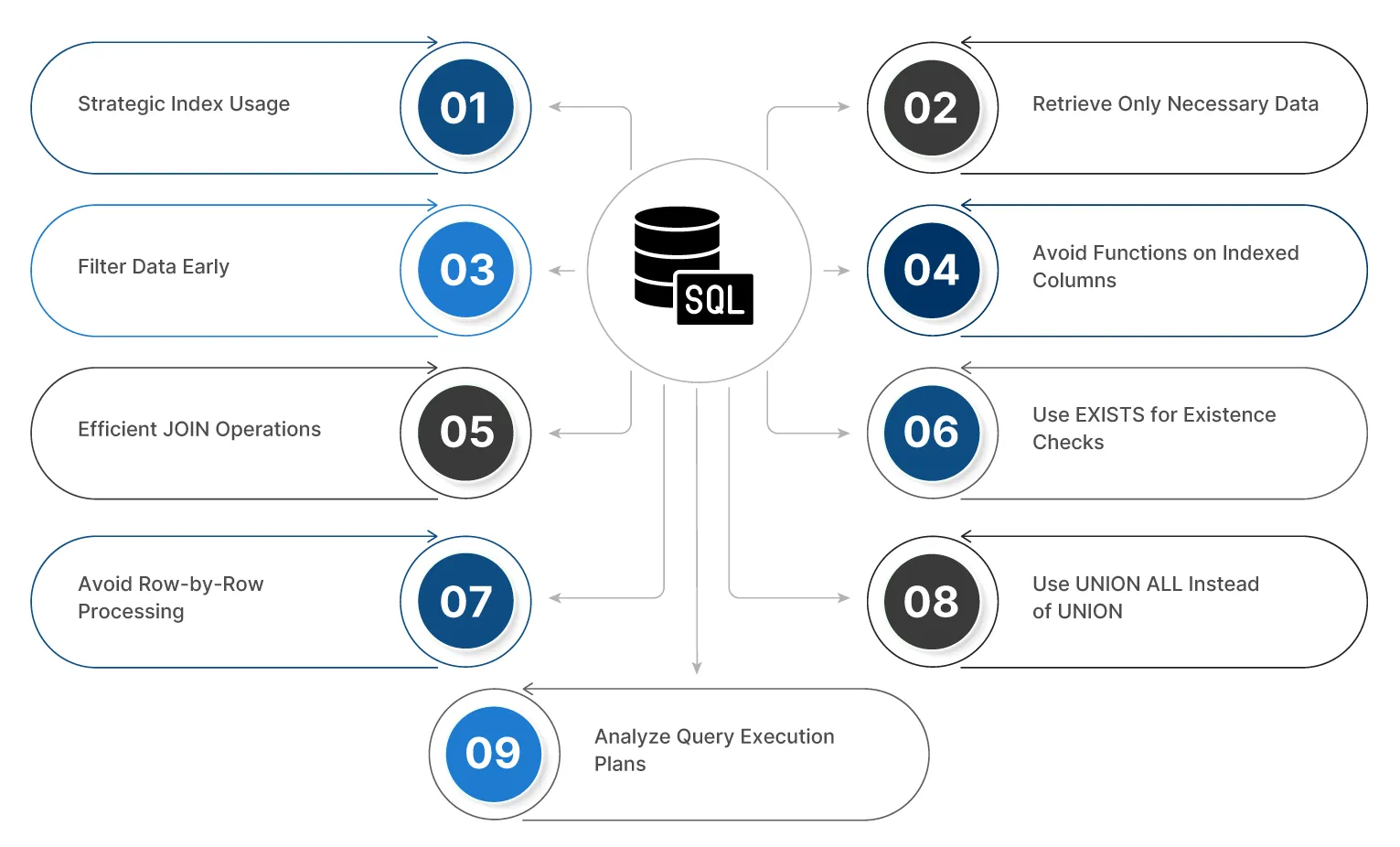
Before diving into specific techniques, it’s important to understand foundational principles that guide SQL query optimization. These principles explain why certain strategies work better than others and provide a consistent framework for optimizing SQL queries at scale.
-
Strategic Index Usage
Indexing frequently used columns in WHERE, JOIN, ORDER BY, and GROUP BY clauses can significantly speed up query execution. However, over-indexing can slow down INSERT, UPDATE, and DELETE operations, so indexing must be applied strategically.
-
Retrieve Only Necessary Data
Avoid using SELECT *. Instead, specify only the necessary columns to reduce data transfer, minimize network and disk I/O, and improve overall query performance.
-
Filter Data Early
Apply filters as early as possible using the WHERE clause. Early filtering reduces the volume of data processed in downstream operations such as joins, sorting, and aggregations.
-
Avoid Functions on Indexed Columns
Avoid applying functions like YEAR() or SUBSTRING() on indexed columns. This prevents the database from using the index and causes full table scans, slowing down performance. Use literals or ranges instead (e.g., WHERE signup date >= ‘2024-01-01’).
-
Efficient JOIN Operations
Join tables on indexed columns with matching data types to enhance performance. Use INNER JOIN instead of OUTER JOIN when possible and filter data before joining to reduce overall database workload.
-
Use EXISTS for Existence Checks
Use EXISTS instead of IN or COUNT (*) when checking for the existence of related records. EXISTS stops processing after the first match, making it more efficient for large datasets.
-
Avoid Row-by-Row Processing
SQL is designed for set-based operations. Avoid row-by-row processing patterns such as the N+1 problem. Use set-based operations like JOIN, CTE, or window functions for better performance.
-
Use UNION ALL Instead of UNION
If duplicates aren’t a concern, use UNION ALL instead of UNION to skip the expensive duplicate-checking process, speeding up the query.
-
Analyze Query Execution Plans
Regularly analyze query execution plans using tools like EXPLAIN to identify inefficiencies such as full table scans or inefficient joins, enabling targeted query improvements.
How SQL Works - The Key to Faster, Smarter Queries
SQL (Structured Query Language) is a standardized language used to manage and manipulate data in relational databases. The process of executing an SQL query involves several stages, ensuring that data is retrieved or modified efficiently.
Let’s break down how SQL queries are processed step-by-step:

1. User Request
The process begins when a user or application sends an SQL query to the database server. This query could be a SELECT statement to retrieve data, an INSERT statement to add new records, or other commands such as UPDATE or DELETE to modify or remove existing data.
2. Parsing and Interpretation
Once the database management system (DBMS) receives the query, it parses the statement to ensure correct syntax and validates that referenced tables, columns, and other database objects exist. This step confirms that the query is logically and structurally valid before execution.
3. Optimization
The DBMS then invokes its query optimizer to evaluate different execution strategies. The optimizer considers factors such as available indexes, data volume, join conditions, and filtering criteria. Based on this analysis, it generates an execution plan that represents the most efficient way to run the query. This plan can be reviewed using tools like EXPLAIN to understand how the query will be executed.
4. Execution
The DBMS executes the query by following the chosen execution plan. This involves interacting with the physical storage layer, accessing memory caches, and performing operations such as joins, sorting, or aggregations, depending on query complexity.
5. Result Return
After execution, the DBMS returns the results to the user or application. For SELECT queries, the requested dataset is returned. For data modification statements such as INSERT, UPDATE, or DELETE, the system provides a confirmation of the completed operation.
This process ensures that SQL queries are handled efficiently, reducing system load and providing fast, reliable data access or modification. Understanding how SQL works at each stage helps developers and database administrators write better queries and apply effective SQL query optimization techniques to improve overall database performance.
12 Proven SQL Query Optimization Techniques to Boost Database Performance
Now that we have covered some essential principles, let’s delve deeper into 12 SQL query optimization best practices that will help you optimize your SQL queries and significantly improve database performance.
1. Strategic Indexing
As mentioned earlier, creating indexes on frequently queried columns is essential. Focus on columns used in WHERE, ORDER BY, and JOIN operations. Consider composite indexes for multi-column searches. Always ensure that your indexes are selective; i.e., they reduce the number of rows returned significantly.
2. **Avoid SELECT ***
Instead of using SELECT * to retrieve all columns, specify only the columns that are necessary for your query. This reduces the load on your database and speeds up data retrieval by minimizing the amount of data transferred and processed.
3. Optimize JOIN Operations
Joins can become performance bottlenecks if not handled correctly. Ensure join columns are indexed, and prefer INNER JOIN over OUTER JOIN whenever possible. Apply filters early using WHERE clauses to reduce the dataset size before joining.
4. Optimize WHERE Clauses
Ensure that your WHERE clauses are written efficiently. Use indexed columns in the WHERE clause and avoid using functions on indexed columns. Filter data as much as possible before other operations like joining or aggregation.
5. Leverage Query Caching
Many databases support query caching, which stores the result of a query in memory. By reusing cached results for identical queries, you can avoid redundant database hits. Ensure that your frequently run queries are optimized to take advantage of caching, reducing database load, and improving response time.
6. Use Batch Processing for Large Data Changes
For large datasets, avoid row-by-row processing. Batch INSERT, UPDATE, and DELETE operations to reduce overhead and allow the database to process changes more efficiently.
7. Partition Large Tables
Partitioning large tables allows the database to divide data into smaller, more manageable pieces. Queries that target a specific partition can run faster because the database only needs to process a portion of the table.
8. Reduce Subqueries
Subqueries can often be rewritten as JOIN or EXISTS clauses, which are more efficient. Where possible, try to avoid using subqueries, especially in SELECT statements, as they can increase query execution time by requiring additional database hits.
9. Optimize Aggregations
When using aggregate functions like COUNT(), SUM(), or AVG(), ensure that the data is filtered beforehand. Applying WHERE clauses to reduce the number of rows before performing aggregations can greatly improve performance.
10. Avoid Using Wildcards
Using wildcards like % in LIKE clauses can cause full table scans, which are slow. Try to avoid starting the search pattern with a wildcard (e.g., LIKE ‘%value’). Whenever possible, use exact matches or indexes on the columns being searched.
11. Use UNION ALL Instead of UNION
The UNION operator removes duplicates, which is a resource-intensive operation. If your result sets do not contain duplicates, use UNION ALL for faster query execution.
12. Optimize Data Types
Choosing the right data types for your columns is crucial. Avoid using larger data types when smaller ones are sufficient. For instance, using INT instead of BIGINT can reduce storage requirements and improve performance.
Essential Tools and Resources for SQL Query Optimization
Effective SQL query optimization requires more than just writing better queries. Using the right tools can make all the difference in analyzing and improving query performance.
- SQL Profiler and Query Analyzers: SQL Profiler tools allow you to analyze query performance by tracking the execution time and resources used for each query. These tools help identify bottlenecks, long-running queries, and inefficient SQL patterns that impact database performance.
- EXPLAIN and EXPLAIN ANALYZE: Most databases support the EXPLAIN and EXPLAIN ANALYZE command, which provides insights into the query execution plan. By analyzing execution plans, you can identify inefficient joins, table scans, and areas that require optimization.
- Database-Specific Optimization Tools: Each database comes with its own suite of optimization tools. For instance, SQL Server provides SQL Server Management Studio (SSMS), which includes features like Query Store and Execution Plans. MySQL has MySQL Workbench, which supports query profiling and performance optimization.
Why TxMinds is Your Ultimate Partner for SQL Query Optimization
At TxMinds, we specialize in helping businesses optimize their database performance with a strong focus on efficient Structured Query Language queries. With our database operations management services, we provide tailored solutions that enhance query performance, reduce resource consumption, and ensure that your systems remain scalable as your business grows.
By leveraging advanced optimization techniques and cutting-edge tools, we help our clients unlock the full potential of their databases. Whether you need to optimize an existing system or design a robust database from scratch, TxMinds ensures faster, more efficient operations with measurable results.
Let us take your SQL query optimization to the next level and help you achieve maximum performance.


Amar Jamadhiar
VP, Delivery North America
Amar Jamadhiar is the Vice President of Delivery for TxMind's North America region, driving innovation and strategic partnerships. With over 30 years of experience, he has played a key role in forging alliances with UiPath, Tricentis, AccelQ, and others. His expertise helps Tx explore AI, ML, and data engineering advancements.
FAQs
What is query optimization in SQL?
-
Query optimization in SQL is the process of improving how a query runs, so it executes faster and uses fewer resources by choosing better access paths, joins, and filters.
How to do SQL query optimization?
-
Start by reviewing the execution plan (EXPLAIN/EXPLAIN ANALYZE), then reduce data scanned (avoid SELECT * and filter early), fix JOIN and WHERE inefficiencies, and validate improvements with runtime metrics.
What are the 12 proven SQL query optimization techniques?
-
The 12 proven SQL query optimization techniques include:
- Strategic indexing
- Avoiding SELECT *
- Optimizing JOIN operations
- Optimizing WHERE clauses
- Leveraging query caching
- Using batch processing for large data changes
- Partitioning large tables
- Reducing subqueries (rewrite as JOIN/EXISTS where possible)
- Optimizing aggregations (COUNT, SUM, AVG, etc.)
- Avoiding leading wildcards in LIKE (e.g., LIKE ‘%value’)
- Using UNION ALL instead of UNION when duplicates don’t matter
- Optimizing data types (use the smallest suitable types)
How does effective indexing for database performance support scaling database performance SQL techniques?
-
Effective indexing for database performance speeds up reads on frequently filtered/joined columns, which is foundational to scaling database performance SQL techniques while keeping indexes selective to avoid slowing inserts/updates.
Discover more