


Recommended Blogs

Blog
The 7 Rs of Cloud Migration: A Decision Framework for Resilience, Cost, and Speed
Table of Content
- How Did the 7 Rs of Cloud Migration Originate?
- Understanding Cloud Migration and Its Business Impact
- The 7 Rs of Cloud Migration Strategies: Frameworks for Business Resilience
- How to Choose the Right Cloud Migration Strategy Using the 7 Rs
- Choose the Right Cloud Migration Strategy with TxMinds
Share On


Cloud migration has reached a point where moving to the cloud is no longer the hard part for enterprises. The real challenge is making the right choices while moving.
Many businesses rush into “lift and shift” to meet deadlines but later realize that they have recreated the same complexity, costs, and operational bottlenecks in a new environment. Others over-invest in modernization too early, refactoring systems that should have been replaced, retired, or simply retained until dependencies are ready.
That is why the 7 Rs of cloud migration matter more than ever. They are not just migration terms; they are a decision framework that helps businesses treat cloud migration like a portfolio transformation.
In this blog, we break down how the 7 Rs originated, what each strategy really means, and how to choose the right cloud migration approach for every workload. If your goal is business resilience, faster delivery, and a cloud environment that performs better than what you left behind, this framework is where the strategy begins.
Key Takeaways
- Gartner’s original 5 Rs (Rehost, Refactor, Revise, Rebuild, Replace) helped enterprises choose the right migration path based on change effort and business need.
- As cloud adoption matured, AWS expanded the model by adding Retire and Retain, acknowledging that some apps should be shut down and others should stay on-prem or hybrid for now.
- The 7 Rs encourage workload-by-workload decision-making instead of defaulting to lift-and-shift across the board.
- When applied consistently, the framework improves resilience and delivery speed while keeping modernization spend focused where it delivers value.
How Did the 7 Rs of Cloud Migration Originate?
The 7Rs of cloud migration have an interesting history. The 7 Rs emerged from Gartner’s 5Rs model (Rehost, Refactor, Revise, Rebuild, Replace) around 2010-2011. It was later expanded by AWS (Amazon Web Services), where they added Retire (2016) and Retain (2017) as the cloud landscape matured.
The 5Rs Model of Gartner
Gartner’s 5Rs model was proposed in 2010-2011. This framework was designed to guide enterprises through cloud application migration and strategies. It helped enterprise leaders handle legacy apps when migrating to the cloud.
- Rehost (Lift and Shift)- This framework enabled businesses to move applications to the cloud without any or with minimal changes.
- Refactor (Replatform)- It helped modify app code slightly to take advantage of cloud-native features.
- Revise (Re-architect/Re-platform)- It extended/modified existing code to better adapt to a cloud-native architecture.
- Rebuild (Re-architect)- It discarded the old code and rebuilt the app from scratch using cloud-native services and technology (PaaS).
- Replace- It scrapped the existing application entirely and replaced it with a third-party, pre-built Software-as-a-Service (SaaS) solution.
This model has been used widely and has become a well-established tool for planning and executing cloud migration.
The 6Rs and 7 Rs Model of AWS
As cloud computing evolved, there was a need for a more comprehensive cloud migration framework. In addition to Gartner’s 5Rs model (some of which were renamed), AWS expanded it by adding the sixth R, Retire, and the seventh R, Retain.
- Rehost (Gartner) → Rehost (AWS): Known as “lift-and-shift,” moving applications as-is.
- Refactor (Gartner) → Refactor/Re-architect (AWS): Modifying application code for cloud-native features.
- Revise (Gartner) → Replatform (AWS): Making minor optimizations (like moving to managed databases) without changing core architecture.
- Rebuild (Gartner) → Refactor/Re-architect (AWS): Rebuilding applications from scratch to use cloud-native features.
- Replace (Gartner) → Repurchase/Replace (AWS): Moving to a different, usually SaaS, product.
- Retire (AWS Extension)- Explicitly decommissioning applications that are no longer needed.
- Retain (AWS Extension): Keeping applications on premises for now.
Understanding Cloud Migration and Its Business Impact
Before an enterprise moves to cloud migration strategies, it is essential to understand what cloud migration is. Cloud migration is the process of migrating apps, data, IT infrastructure, and workloads to cloud-based infrastructure.
The migration helps businesses leverage benefits like lower costs, better scalability, access to the latest technology, and enhanced disaster recovery. Cloud migration is often done when a company faces challenges like rising costs, aging infrastructure, and many more.
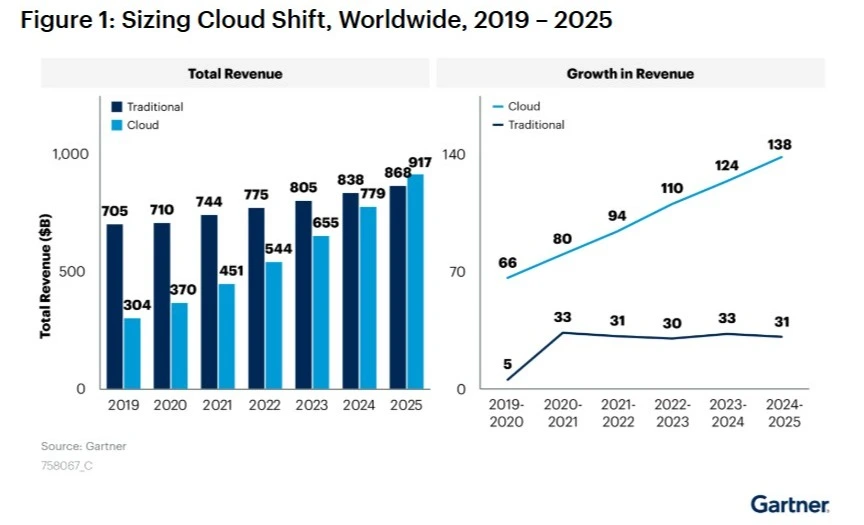
Cloud migration is moving at a fast pace, and in a survey of 500 global leaders, 69% of the leaders strongly say that technical debt is slowing their business growth, leading them to a solid cloud migration strategy.
The 7 Rs of Cloud Migration Strategies: Frameworks for Business Resilience
The 7 Rs of cloud migration offer a practical cloud migration strategy to choose the right path for every application moving to the cloud. This framework helps enterprises balance speed, cost, and modernization while improving reliability and long-term business resilience.
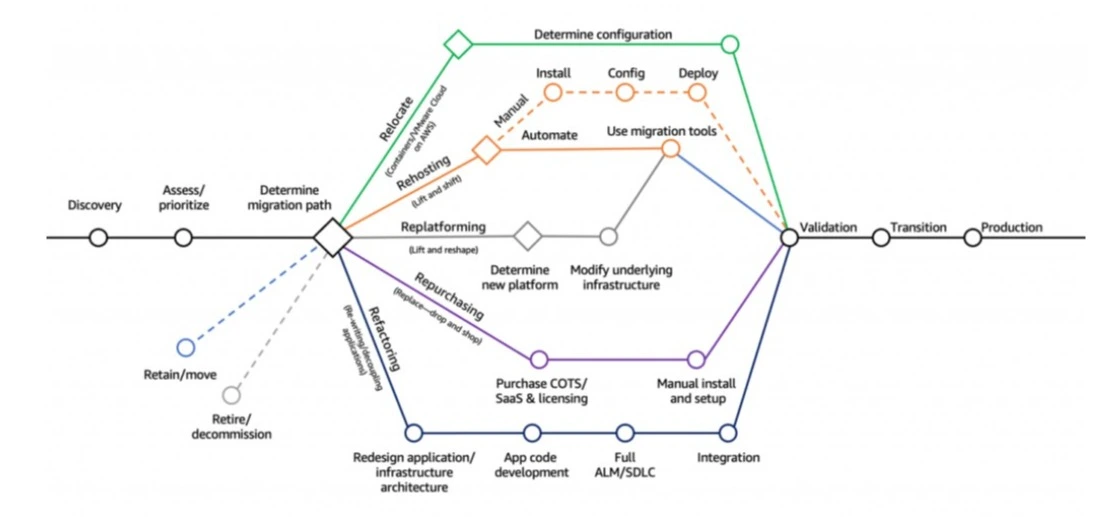
1. Rehost
Rehost is the simplest cloud migration approach, where an application is moved to the cloud largely as it is, with little to no change in the code or design. Teams choose rehosting when speed matters more than modernization, and when they want to shift workloads off aging infrastructure; without redesigning the application.
Benefits:
- Faster migration with minimal code changes
- Lower risk of functional disruption compared to redesign-heavy approaches
- Improved infrastructure resilience through cloud redundancy and backups
- Quicker path to basic disaster recovery readiness
For example, a company moves an internal payroll portal from on-prem virtual machines to cloud virtual machines and keeps the same application stack, configuration, and release process so the business can exit its data center on schedule.
2. Relocate
Relocate involves moving virtual machines to a cloud environment without changing the application, often by transferring workloads at the virtualization layer. It is commonly used when organizations want to move a large set of VM-based systems quickly while keeping the same operational model and familiar tooling.
Benefits:
- Rapid movement of large VM estates without application rewrites
- Minimal disruption because operational practices can remain consistent
- Easier consolidation and standardization of infrastructure operations
- Improved recovery options through cloud-based replication and restores
For example, an enterprise moves hundreds of VMware-based workloads from its private data center to a cloud-hosted VMware environment so teams can keep current processes while improving availability and recovery options.
3. Replatform
Replatform means moving an application to the cloud while making a few targeted improvements to better fit the new environment, without changing the core architecture. The application still works the same way, but certain components are modernized, such as switching to managed databases or managed runtime services to reduce operational burden.
Benefits:
- Better stability and scalability without a full redesign
- Reduced operational overhead through managed services
- Improved high availability and backup posture with cloud-native capabilities
- Faster modernization than refactoring, with stronger long-term value than rehosting
For example, a retail application is moved to the cloud, and its database is upgraded from a self-managed database server to a managed database service, while the application code and overall design remain the same.
4. Refactor
Refactor is a deeper form of migration where the application is redesigned to take advantage of cloud-native architecture, not just cloud infrastructure. This can involve breaking a monolith into services, using event-driven design, or adopting serverless components so the system can scale and recover more effectively.
Benefits:
- Stronger resilience through fault isolation and elastic scaling
- Better performance and availability under variable demand
- Faster delivery cycles enabled by modern deployment patterns
- Greater long-term flexibility to adopt new cloud services and capabilities
For example, a food delivery platform refactors its monolithic ordering system into separate services for cart, pricing, payments, and order tracking so each part can scale independently and recover without bringing down the full system.
5. Repurchase
Repurchase means replacing an existing application with a cloud-based SaaS product instead of migrating the old system. Rather than carrying forward legacy complexity, the organization adopts a modern solution that is already designed to run reliably in the cloud and is maintained by the vendor.
Benefits:
- Faster modernization compared to rebuilding or refactoring
- Reduced infrastructure and maintenance responsibility for internal teams
- Predictable upgrades and patches managed by the provider
- Improved reliability when moving to mature, cloud-native SaaS platforms
For example, a company replaces its on-prem CRM with a SaaS CRM platform and migrates customer data and integrations, retiring the old CRM servers entirely.
6. Retire
Retire is the decision to decommission an application because it is no longer needed, is duplicated elsewhere, or does not justify the effort and cost to migrate. Retirement is a key part of a cloud migration strategy because it reduces the size of the portfolio and removes unnecessary complexity.
Benefits:
- Lower costs by removing licenses, infrastructure, and support effort
- Reduced risk and attack surface by eliminating unused systems
- Smaller migration scope, which improves delivery speed and quality
- Cleaner architecture by removing redundant capabilities
For example, after reviewing usage, an organization shuts down an old reporting tool that only a few teams still access because a newer analytics platform already covers the same needs.
7. Retain
Retain means keeping an application where it currently runs, at least for now, while still including it in the overall migration plan. Retain is also more common than people assume, because hybrid cloud remains the enterprise reality. In fact, 90% of organizations are expected to adopt hybrid cloud through 2027, which is why retaining select workloads is often part of a mature cloud migration strategy.
Benefits:
- Avoids high-risk moves that could cause downtime or compliance issues
- Supports phased migration when dependencies require careful sequencing
- Protects stability for critical systems while other workloads modernize
- Creates time to build a stronger long-term business case and target design
For example, a bank retains a core transaction system on-prem because of regulatory and latency requirements but modernizes surrounding services in the cloud and revisits the core system once requirements and integration paths are clearer.
How to Choose the Right Cloud Migration Strategy Using the 7 Rs
Choosing the right cloud migration approach from the 7 Rs of cloud migration is what makes a cloud program successful. Instead of migrating every application the same way, enterprises should evaluate each workload based on business value, technical complexity, compliance needs, and urgency.
| 7 Rs Approach | What is it Best For | Speed of Migration | Cost/Effort | Risk Level | Modernization Value | Best Fit Workloads |
|---|---|---|---|---|---|---|
| Rehost | Fastest move with minimal change | High | Low | Low | Low | Stable apps, urgent timelines, legacy workloads |
| Relocate | Large-scale VM moves without changing apps | High | Low–Medium | Low | Low | VMware-heavy portfolios, VM estates |
| Replatform | Small upgrades while migrating | Medium–High | Medium | Medium | Medium | Apps needing better scalability, managed DB shift |
| Refactor | Full cloud-native redesign | Low | High | Medium–High | Very High | Core digital apps, high-growth systems |
| Repurchase | Replace with SaaS | Medium | Medium | Medium | High | Commodity tools like CRM, HR, and ITSM |
| Retire | Shut down unused/low-value apps | High | Low | Low | Medium | Duplicate systems, outdated tools, and low adoption apps |
| Retain | Keep as-is for now | High | Low | Low | Low | Compliance-heavy apps, complex dependencies |
When the 7 Rs are applied with clear decision-making, businesses reduce migration risk, improve reliability, and build a stronger foundation for long-term resilience.
Choose the Right Cloud Migration Strategy with TxMinds
We work with you to simplify cloud modernization decisions and turn them into a clear plan of action. With our robust cloud modernization services, we assess your applications, dependencies, and business priorities, then align each workload to the right cloud migration strategy, so you avoid unnecessary rework and move forward with confidence.
We also support execution end-to-end, from structured migration planning to modernization and optimization, with a focus on minimizing downtime and protecting business continuity. As your cloud landscape evolves, we help you modernize what matters most and build a foundation that is ready for scale, security, and long-term change.
Connect with our cloud experts today to understand the right cloud migration approach for your enterprise.


Amar Jamadhiar
VP, Delivery North America
Amar Jamadhiar is the Vice President of Delivery for TxMind's North America region, driving innovation and strategic partnerships. With over 30 years of experience, he has played a key role in forging alliances with UiPath, Tricentis, AccelQ, and others. His expertise helps Tx explore AI, ML, and data engineering advancements.
FAQs
What is a cloud migration strategy?
-
A cloud migration strategy is a structured plan that defines how applications, data, and workloads move to the cloud based on business goals, risk, cost, and technical complexity. It helps organizations choose the right migration approach instead of moving everything the same way.
What are the types of cloud migration?
-
The types of cloud migration include rehosting, relocating, replatforming, refactoring, repurchasing, retiring, and retaining applications. Each type addresses different needs, from fast moves to deep modernization.
What are the 7 types of cloud migration?
-
The 7 types of cloud migration are Rehost, Relocate, Replatform, Refactor, Repurchase, Retire, and Retain. Together, they form a decision framework that helps enterprises balance speed, cost, and long-term value.
Why do enterprises use different types of cloud migration instead of one approach?
-
Enterprises use different types of cloud migration because applications vary in criticality, complexity, and compliance needs. Selecting the right approach for each workload reduces risk, avoids unnecessary rework, and improves overall migration outcomes.
Discover more