


How to Outsmart Cold Starts: 7 Essential Techniques for Serverless Apps


Table of Content
- Why Cold Starts Matter Beyond Engineering
- The 7 Essential Techniques to Reduce Cold Starts
- The Enterprise Trade-Off: Performance, Cost, and Architectural Complexity
- Building a Cold-Start-Resilient Serverless Strategy
- How TxMinds Helps Enterprises Modernize Serverless Performance


A serverless cloud native application can look efficient on a cloud bill and still feel slow at the exact moment customers, employees, or partners need it most. That is the cold start problem where the delay is created when a function must initialize before it can respond.
For enterprise leaders, this is not a niche engineering concern. It can affect checkout flows, authentication, claims processing, trading dashboards, customer portals, and any event-driven workflow where latency shapes trust.
Recent research from USENIX OSDI, based on production serverless systems at Ant Group, found that cold start latency can still range from hundreds of milliseconds to several seconds, even after applying prior optimization techniques. The study also identifies control-path latency, resource contention, and runtime-metadata loading as overlooked contributors to the problem.
This blog will explore seven practical techniques modern enterprises can use to reduce cold starts, improve application responsiveness, and make serverless architectures more predictable at scale.
Why Cold Starts Matter Beyond Engineering
A cold start occurs when a serverless function is inactive and the cloud platform needs to initialize it before responding to a request. This setup can include loading the runtime, application code, dependencies, configuration, and connections to other services.
For enterprise leaders, the concern is not only the delay. The concern is where the delay happens and what it affects.
Cold starts can impact:
- Customer login flows
- Payment authorization
- Claims and loan processing
- Internal approval workflows
- Mobile and web application APIs
- Real-time dashboards and alerts
In these situations, even a short delay can affect user experience, transaction completion, employee productivity, and service-level performance.
Serverless is valuable because it scales with demand. It helps enterprises avoid paying for idle infrastructure and supports faster application delivery. However, when functions scale down during low usage and are called again later, cold starts can create inconsistent response times.
The priority is to identify which workloads are sensitive to cold starts and which are not. This allows enterprises to invest in the right mitigation techniques without increasing cloud costs unnecessarily.
The 7 Essential Techniques to Reduce Cold Starts
Reducing cold starts in serverless applications requires a practical mix of architecture, configuration, and code-level discipline. The goal is not to optimize every function equally. The goal is to protect the workloads where latency affects revenue, user trust, operations, or service commitments.
Here are the 7 essential techniques enterprises should prioritize:
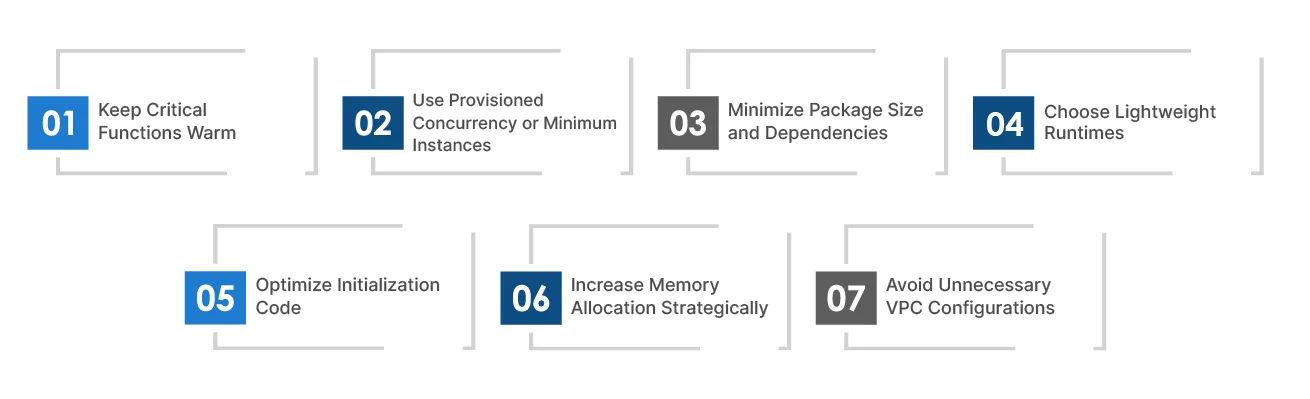
1. Keep Critical Functions Warm
Scheduled invocations can call selected functions at regular intervals, so they remain active and ready to respond. This is useful for workloads with predictable usage patterns, such as business-hour portals, approval workflows, or regional service peaks.
How: Use scheduled triggers to invoke priority functions every few minutes during known demand windows.
Best for: Important but moderate-traffic workloads where occasional latency affects user experience, but full-time pre-provisioning is not required.
2. Use Provisioned Concurrency or Minimum Instances
Provisioned capacity keeps a set number of function instances initialized before requests arrive. This reduces the risk of delay when users hit a critical API or workflow.
How: Configure provisioned concurrency, pre-warmed instances, or minimum instances based on traffic patterns and service-level requirements.
Best for: Customer-facing APIs, checkout flows, authentication services, trading dashboards, and other latency-sensitive enterprise systems.
3. Minimize Package Size and Dependencies
Large function packages take longer to load and initialize. Heavy libraries, unused modules, and oversized frameworks increase startup time and add maintenance risk.
How: Remove unused dependencies, split large functions into smaller services, use lean libraries, and apply shared layers where they make sense.
Best for: Applications with large deployment packages, heavy frameworks, or functions that have grown over time without dependency review.
4. Choose Lightweight Runtimes
Some runtimes initialize faster than others. Lightweight scripting runtimes or compiled languages may reduce startup time depending on the workload and platform.
How: Select runtimes based on performance needs, developer capability, security standards, and long-term maintainability.
Best for: New serverless applications, cloud modernization and migration programs, and performance-sensitive workloads where runtime choice is still flexible.
5. Optimize Initialization Code
Cold starts become worse when too much work happens before the function can process a request. Database connections, SDK clients, configuration files, and external calls can all slow down startup.
How: Move reusable setup outside the request path, initialize only what is needed, defer non-critical tasks, and reuse connections where supported.
Best for: Functions that depend on databases, APIs, third-party services, or large configuration files during startup.
6. Increase Memory Allocation Strategically
In many serverless platforms, memory allocation is linked to CPU power. More memory can help a function initialize and execute faster, even when memory usage itself is not the main issue.
How: Test multiple memory settings, compare response time against cost, and choose the configuration that delivers the best performance-to-cost ratio.
Best for: Compute-heavy functions, slow-starting workloads, and applications where performance gains may offset higher per-invocation pricing.
7. Avoid Unnecessary VPC Configurations
Private network access can add startup overhead when a function needs to connect to internal databases, caches, or enterprise systems. Sometimes this is required. Often, it is applied by default.
How: Attach functions to private networks only when they need protected resources, and review network design, connection reuse, and service placement.
Best for: Enterprise workloads involving databases, internal services, compliance-sensitive systems, or hybrid cloud architectures.
The Enterprise Trade-Off: Performance, Cost, and Architectural Complexity
Cold start mitigation should not be applied evenly across every serverless function. Some techniques improve response time but increase cost. Others reduce latency but add engineering effort, monitoring needs, or architectural complexity. For leaders, the priority is to identify where cold starts create real business risk and where standard serverless behavior is acceptable.
A payment API, authentication service, fraud check, or customer portal may need stronger protection because delays affect revenue and trust. A background report or non-urgent integration may not justify the same investment. The right strategy is to match mitigation effort with workload criticality, user impact, service-level expectations, and cloud cost governance.
- Protect revenue-facing workloads first: Checkout flows, authentication, customer portals, trading dashboards, and real-time decision systems need the strongest controls.
- Use pre-warmed capacity where delay is unacceptable: Provisioned concurrency or minimum instances make sense when consistent response time is part of the business requirement.
- Avoid paying for speed where it adds little value: Reporting jobs, notifications, and asynchronous processing often benefit more from cost efficiency than instant startup.
- Fix the basics before adding spend: Smaller packages, fewer dependencies, cleaner initialization code, and better memory settings can reduce latency without immediately increasing infrastructure cost.
- Review architecture choices carefully: Private network access, heavy frameworks, large container images, and complex startup logic can all slow down function initialization.
- Measure tail latency, not just averages: p95 and p99 latency show where users are feeling delays. Average response time often hides cold start issues.
- Set clear governance rules: Teams should know when to use warming, provisioned capacity, runtime changes, memory tuning, or network optimization, instead of making those decisions function by function.
Building a Cold-Start-Resilient Serverless Strategy
Cold starts should be managed before they affect users. For enterprises, this means making them part of regular performance reviews, release checks, and cloud cost decisions.
A practical strategy has four parts:

1. Measure what matters
Track cold starts separately from normal requests. Look at initialization time, p95 and p99 latency, error rates, and the journeys affected. Averages can make the platform look healthy while important users still face delays.
2. Rank workloads by business impact
Login, checkout, payment, fraud checks, customer portals, and real-time dashboards need tighter controls. Reporting jobs, exports, and background notifications may not.
3. Use the right fix for the right case
Provisioned concurrency, minimum instances, or pre-warmed capacity are useful where response time must be consistent. For other workloads, start with leaner packages, fewer dependencies, runtime review, memory tuning, and cleaner startup logic.
4. Review every major change
New dependencies, larger packages, private network access, and heavier initialization logic can bring cold starts back. Release reviews should check these items before they reach production.
This approach for building a cold start serverless strategy helps businesses protect critical services without turning serverless into an expensive model.
How TxMinds Helps Enterprises Modernize Serverless Performance
At TxMinds, we help enterprises build serverless and cloud-native applications that are designed for scale, speed, and reliability from the start. Cold starts are rarely a standalone issue. They often point to deeper gaps in application design, deployment practices, dependency management, observability, or cloud configuration.
We assess where latency affects the business most, then design the right path forward. That may include re-architecting applications into serverless functions, building cloud-native apps, modernizing legacy systems, setting up CI/CD pipelines, improving monitoring, or optimizing workloads across AWS, Azure, GCP, and hybrid cloud environments.
We also help teams use the right mix of serverless, containers, microservices, DevOps, and automation so performance does not depend on ad hoc fixes after launch.
Ready to make your serverless applications faster and more predictable? Connect with TxMinds to assess your cloud-native architecture and build a practical roadmap for performance, scalability, and cost efficiency.

Vivek Gupta
VP, Delivery, Digital Engineering
Vivek Gupta is the Vice President of Delivery at Tx with over 25 years of experience driving digital transformation. At Tx, he has built the foundation for DevOps, Digital, and Cloud practices, shaping strategies that empower businesses. Before joining Tx, Vivek held leadership roles at Infosys and Tech Mahindra. His leadership fuels innovation, strengthens delivery excellence, and enhances Tx's global impact. Vivek's commitment to driving change ensures our clients stay ahead in an evolving digital landscape.
Discover more